Showing posts with label zspheres. Show all posts

Zbrush: Armature tests

No Comments »

I've been doing some studying on Zbrushworkshops.com - One of the free lessons explains the many ways in which you can start your sculpt. I wanted something which was similar to clay sculpting so tried the Armature/wire maquette style which utilises Zspheres. Rather than getting the main form from the spheres you instead keep them at minimum width and treat them as a wire base for the basic curves/shapes (much like a wire armature in clay). I used a basic dynamic pose here to see how it worked within the program.


 From there you can then start adding spheres with dynamesh (and insert basic shapes) to block out the main form, as if you were sticking the clay on the wire. It allows you to sculpt in pose which I like personally (as I want to eventually work on maquettes/statues for personal work).


Above: The back roughed out, I feel it's easier to sculpt the back when in pose
Below: The front view. The torso is intended to be based on Hal Jordan/Green lantern but just added a quick face for testing.


 A Couple of pros and cons for this technique:

Pros:
  • You have the potential of getting extremely dynamic/organic sculpts from using this
  • Traditional sculptors I see this as the most natural way to get in to digital sculpting
  • The model will look more natural if sculpting in pose rather than doing that after, this technique forces you to not work symmetrical.
Cons:

  • This technique is no good for game characters or animation, riggers would have a nightmare!
  • As I worked out (as I didn't really follow it exact) you have to get your proportions correct with this then keep to them (once the zspheres are moved to correct lengths use ctrl while moving to ensure they don't stretch. This is important for all sculpting but you can quickly mess up as in pose.
  • Can be harder to fix errors. Due to the non symmetrical nature of the sculpt mirror and welding will not work. 
  • It can take longer than a regular static pose - working with no symmetry and likely using in dynamic poses, constantly checking shape can take longer. Also working out how anatomy moves at certain angles really takes a precedence!
Overall I'll definitely try this style again, perhaps with a nice simpler cartoon style character and build my way up, not quite there yet to utilise the strengths this technique can produce.


Oops need to work on legs sometime!
Zbrush: Dynamic pose tests

1 Comment »


This week I've been setting some time aside to practice some Dynamic poses for full figures. I've always wanted to progress my sculpting to the level of working on a comic or pop art statue (maybe get it 3d Printed when I'm at a good enough level).

I'll probably be getting some real armature rigs set up for testing (as I'm dying to test real clay, so many great influences such as the Shiflett Brothers) in the meantime I took advantage of the Mannequin tools in Zbrush 4 and above (might even be in 3!)

These are very simple to move around and duplicate so good to give a basic idea of shape and form. It is great for prototyping shapes (particularly if you have a basic idea in mind). I also found that it provided a fun puzzle when using comic references to see where all the hidden limbs go while still feeling dynamic and fluid!


Above: This was the first test, I wasn't using reference and didn't really have an idea but it ended up looking a little by a stiff arm done by an American footballer, this was also to test adding basic objects to the scene.

 Below: The first comic based test. This was intended to be Batman and Robin. I was trying to work off a silver age batman image in which he is throwing a Baterang. These classic throw poses always have great curves but in 3D it looks a little awkward. With the cape though if I added one I think it would add to the overall curves and flows of the object.


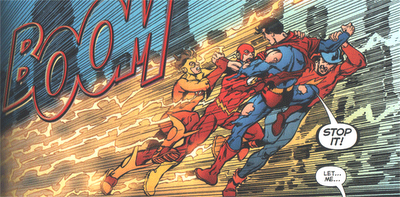
Below was a test from a comic panel from the Infinite Crisis, in which 3 Generations of flash try to take Superboy Prime in to the speedforce. Here is the panel I got the main reference from (also checked out general 100m sprint poses;

http://photos1.blogger.com/blogger/2238/2450/400/flashes.0.png


Finally, I always wanted to see a Captain America statue where he dives through a window or similar, this made me think about how to make something which could potentially be supported if I made a physical sculpt/print of it. So here I worked with that in mind and have him diving in to a load of Hydra agents (I'd probably add one or 2 more). 


This is my favourite as it's the statue/pose I've been thinking about before this task. I'm thinking of taking this forward as a custom sculpt as although it contains a lot of models all Hydra agents look the same! Now I have the base for the shape and form I could work on the models separately then bring them in to a new scene allowing for a little more control.


Zbrush digital sculpting

No Comments »

I have rarely had more fun testing out/ 'Hobbying' as my lecturer used to call it than when recently trying out digital sculpting in Zbrush. It has got me hooked and I intend to learn this along side my current modelling / lighting tasks. It may slow my initial learning down but it is great fun and is helping me get more of an interest in organic modelling.

Above: My First attempt at sculpting a face from a sphere. No references.
Below: Adding ears and some room for the eyes (need to work on ears!). No Reference


Zspheres have been interesting to use and my first attempt at using them ended up with an interesting male torso a little heavy chested. As a note I find it best to create the base torso using zspheres and moving the body in to a basic shape then using the adaptive skin (default 'a' when still moving zspheres) and altering the density to 3-4 and getting the basic shape down. After this I create the polymesh3D and save it as a tool. Although I remove quite a bit of flexibility of the zspheres moving the character after doesn't seem too hard and I can start upping the poly count more.


Above: A turntable of my first attempt at a torso. No reference.

All of this learning has inspired me to buy an anatomy book. I bought Anatomy For the Artist a DK book. Plenty of pictures and character studies in there. Next week my goal is to create an anatomically correct model. Maybe even attempt a whole body (albeit a simple one).

Finally for those also interested in trying it please remember instead of saving the document you save the tool. I lost the above torso after wanting to do some more work on it today. I must have saved the document in error. It gave me another go at creating one from scratch though.


Above: my second attempt at a torso. No reference.